
Everything Saytify does.
In plain words, with no marketing fog.
Small app. Serious engine.
Everything runs on your PC: recognition, correction, formatting and typing.
Median on the developer’s PC. Longer dictations stream while you speak.
Your desktop and your laptop, personal use.
Recognition runs locally. Only the license check goes online.
Choose how hard the corrector works and how long it waits.
Auto-correction you can dial
Pick Light, Medium or High. Higher levels correct spelling and grammar more aggressively and wait a little longer for the perfect sentence.
Stronger correction with a slightly longer wait. The default on most PCs.
Context styles
Tell Saytify where the text is going and it formats accordingly.
Personal dictionary
Teach it your names, brands and project words once.
History with word counts
Every dictation is kept locally with its word count. Copy it again any time.
Key or mouse button
Hold Right Ctrl by default — or map a thumb button on your mouse so one hand stays on the keyboard.
Auto-tunes to your PC
Saytify picks lighter models on low-RAM machines and the full engine on capable ones. No settings to study.
AutoCAD voice commands
Say the command, keep drawing.
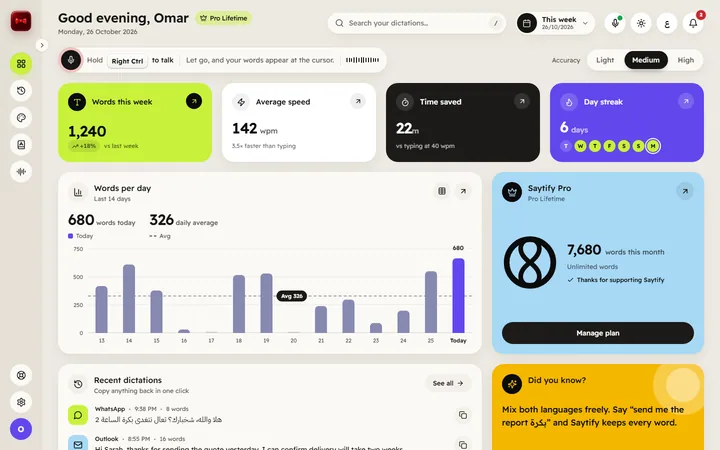
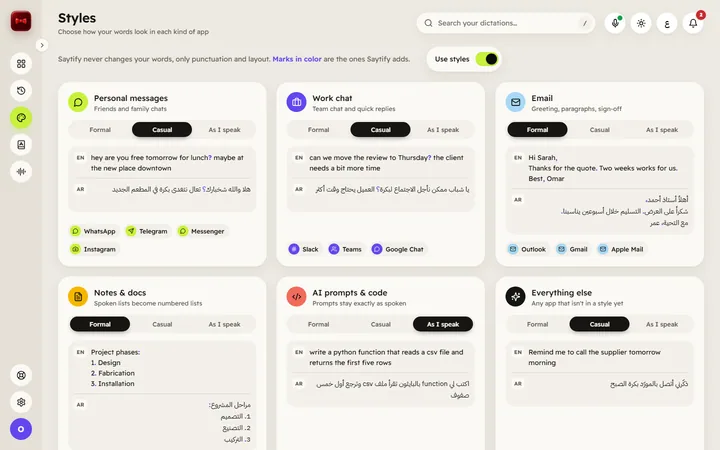
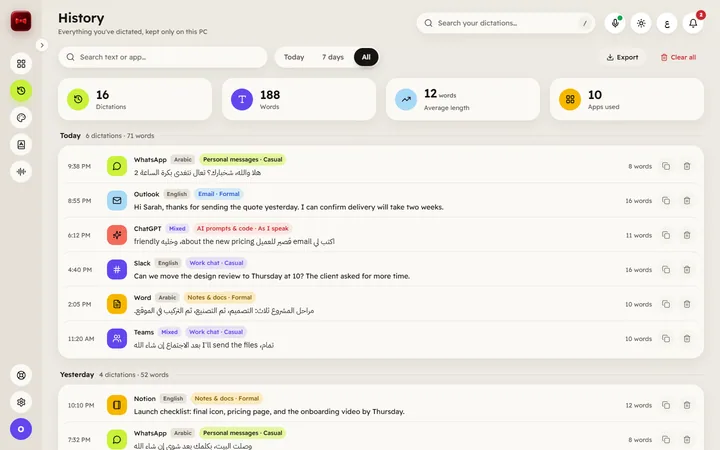
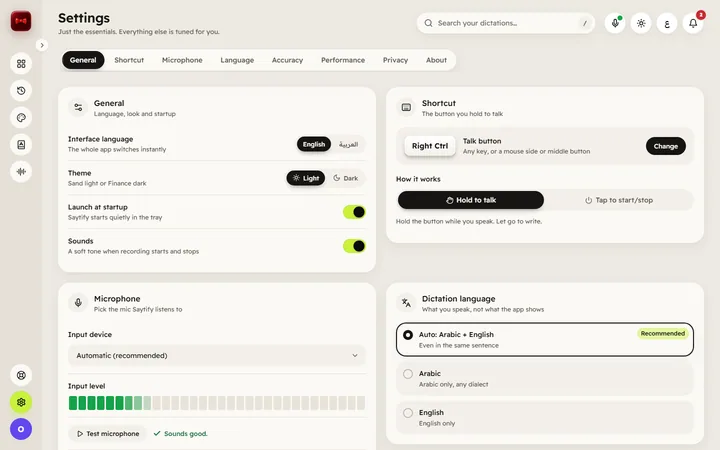
Three steps. Two minutes.
No account inside the app, no cloud, no learning curve.
Install and pick your key
Run the installer, choose the push-to-talk key or mouse button, let the models download once.
Hold and speak
Arabic, English or both. Say it the way you would say it to a colleague.
Release — it is typed
Clean text appears at your cursor, in whatever app is in front of you.
Arabic and English, in the same breath.
Most dictation tools make you pick one language. Saytify follows you when you switch mid-sentence — the way people in Saudi actually speak.
Code-switching built in
English words inside an Arabic sentence stay English, in Latin letters, with correct direction.
Your dialect, kept
Saytify keeps the words you said instead of forcing formal Arabic on you.
Numbers and units formatted
Dates, prices and measurements come out as digits, the way you would type them.
أرسل الـinvoiceلـAhmedقبل الساعة5وخلّه يراجع الـlayoutالنهائي
Your voice stays on your PC.
Saytify was built for people who dictate confidential things: contracts, drawings, medical notes, family messages. After the one-time setup it works with the Wi-Fi switched off.
The site meeting moved to Tuesday — bring the revised drawings.
Stays on your device
- Your voice
- Your text
- Your history and dictionary
- The AI models
Goes online
- License check (about once a month)
- Updates, when you choose
Draw with your voice.
Hold the command button, say “offset”, “trim” or “zoom extents”, and Saytify sends it to the AutoCAD command line — your hands stay on the mouse.
- Command mode on a separate button, so dictation and drawing never mix up
- Windows voice commands too: switch windows, copy, paste, undo
- Works with any AutoCAD-style command line that accepts typed commands
The exact command list ships with the Windows release and is published on this site.
Questions, answered.
Does Saytify really work without internet?
Which Windows versions are supported?
Can I mix Arabic and English in one sentence?
Will it change my dialect into formal Arabic?
How many PCs can I use?
What is the pre-order, exactly?
Is there a free trial?
When is the Mac version coming?
Start saying it.
Lifetime license for Windows, founders price SAR 499 (≈ $133), VAT included. Key emailed instantly.
- Works with Wi-Fi off
- 14-day money-back
- Pay with mada, Visa, Mastercard, Apple Pay